

Download Game Key Revealer – game key revealer, game password recovery, recover lost game keys, retrieve game activation codes, game key finder
Overview
Game Key Revealer is a specialized utility tool designed to assist gamers in recovering lost or forgotten game activation keys. Its primary purpose is to serve as a reliable solution for retrieving credentials from a vast library of video games, addressing a common pain point in digital gaming: the loss of access due to forgotten passwords or missing keys. The app targets both casual players and dedicated enthusiasts who manage multiple game accounts and installations across their systems.
While the developer, GameKeyRevealer.com, is not elaborated upon beyond the domain name, the app’s focus on functionality and efficiency suggests a targeted approach to solving a niche but significant challenge in the gaming ecosystem. Real-world use cases include regaining access to purchased games after reinstalling an operating system, recovering keys from old game installations, or consolidating credentials for future reference. In the broader context of productivity tools, Game Key Revealer fills a unique gap by offering a streamlined, no-frills method for game key recovery, making it a valuable asset for users who prioritize digital organization and uninterrupted gameplay.
Key Features & Functionality
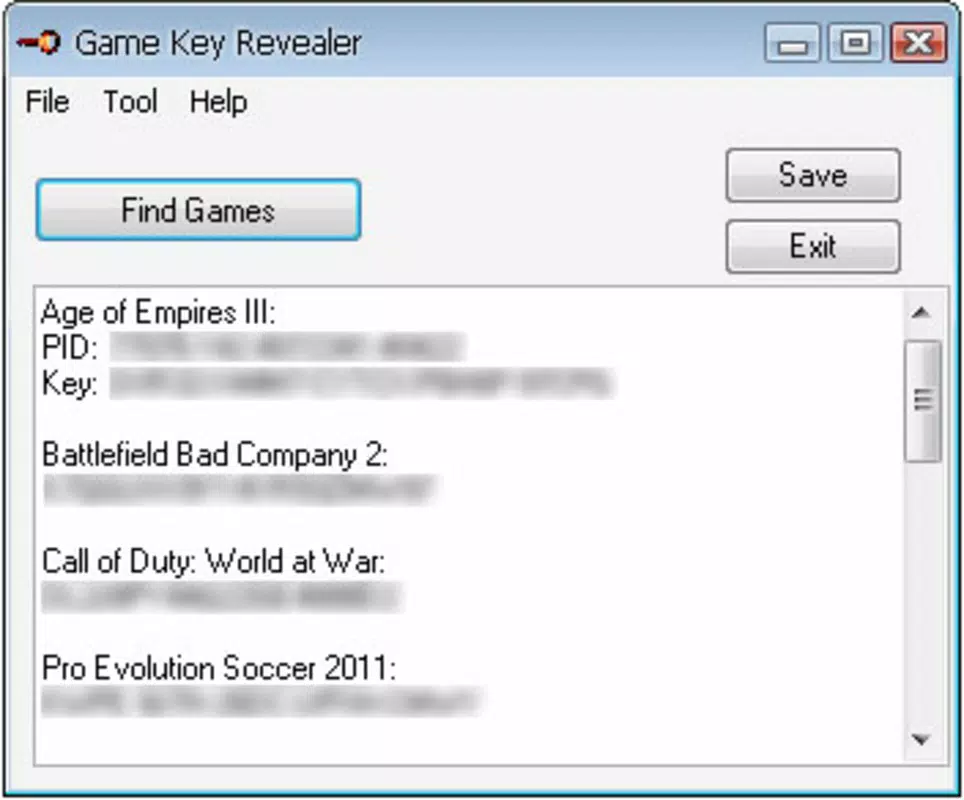
- Extensive Game Library Coverage – The tool supports over a thousand gaming titles, including major franchises such as Battlefield 2, Call of Duty: Modern Warfare, Red Alert 3, and Half-Life. This breadth ensures compatibility with a wide range of PC games, from legacy titles to more recent releases, making it a versatile recovery solution.
- One-Click Save to TXT File – All recovered game keys are automatically compiled and saved in a plain text file with a single click. This feature simplifies the backup process, allowing users to securely store their credentials in a format that is easily accessible and compatible with most digital storage systems.
- Portable and Installation-Free – Game Key Revealer does not require installation. It runs directly from the executable file, minimizing system footprint and eliminating the need for complex setup procedures. This makes it ideal for use on shared or temporary devices without leaving behind traces or requiring admin rights.
- Data Security and Consolidation – By centralizing all retrieved keys in one location, the tool reduces the risk of data fragmentation and potential exposure. This consolidation enhances security by minimizing the number of places where sensitive information is stored, thereby lowering the chance of unauthorized access.
For example, a user reinstalling their operating system can quickly restore access to their game library by running Game Key Revealer on the old drive, retrieving keys, and saving them for future use. Similarly, a collector managing dozens of games can use the tool to audit and archive their digital inventory efficiently.
Interface, UX & Performance
The interface of Game Key Revealer is designed with simplicity and functionality in mind. It presents a minimalistic layout focused on core tasks—scanning for keys and saving results—without unnecessary visual distractions. Navigation is straightforward, with clear buttons for initiating scans and exporting data.
The visual style aligns with standard utility applications, prioritizing usability over aesthetic flair. Although the developer did not list formal performance metrics, the app’s small file size of 2.5 MB suggests optimized resource usage, likely resulting in fast startup times and low memory consumption. The tool operates efficiently on various Windows device categories, from older systems to modern machines, though specific compatibility details were not disclosed.
Responsiveness is expected to be high due to its lightweight nature and lack of background processes. Stability appears reliable, given its focus on a single, well-defined task. The absence of installation requirements further contributes to a stable user experience, reducing the risk of conflicts with other software.
Overall, the UX is tailored for practicality, ensuring that users can complete their recovery tasks with minimal friction.
Platform Compatibility & Technical Requirements
Game Key Revealer is designed exclusively for the Windows platform. It runs on Windows operating systems, though the specific version requirements were not provided by the developer. The app has a compact file size of 2.5 MB, which indicates low system resource demands and fast deployment.
As a portable application, it does not require installation, making it accessible across different user profiles and devices without administrative privileges. The developer did not specify minimum OS requirements, nor did they detail any hardware dependencies. This lack of information suggests that the tool is built to function on a broad range of Windows environments, but users should exercise caution when deploying it on unsupported or outdated systems.
Compatibility with newer Windows versions is likely, but this has not been confirmed. The app’s lightweight design supports its use on both older and modern machines, though users are advised to verify system compatibility before use.
Pros and Cons
- Supports over 1,000 gaming titles, including major franchises
- One-click export of recovered keys to a TXT file
- Portable and installation-free, ideal for temporary or shared devices
- Minimal system resource usage due to small file size
- Enhances data security through centralized key management
- Developer did not provide detailed OS compatibility information
- Platform is limited to Windows only
- Specific technical requirements were not listed
- Security practices beyond file storage were not disclosed
- No official update history or version changelog provided
FAQ
Is Game Key Revealer safe to use?
The app is designed to scan local game installations for stored keys and does not transmit data to external servers. However, users should ensure they download the tool only from the official source to avoid tampering.
Can I use Game Key Revealer on multiple computers?
Yes, since it is portable and does not require installation, you can run it on any Windows device where your game files are stored.
Does Game Key Revealer work on Windows 11?
While the developer did not specify compatibility, the app’s lightweight design suggests it is likely compatible with Windows 11, though testing on your system is recommended.
How do I recover my game keys using this tool?
Simply run the executable, allow the scan to complete, and use the 'Save' button to export all retrieved keys into a TXT file for safekeeping.
Is Game Key Revealer free to download and use?
Yes, the app is available at no cost. There are no hidden fees or in-app purchases.
Final Thoughts
Game Key Revealer stands out as a focused, efficient utility for gamers facing the frustration of lost game keys. Its ability to scan over a thousand titles, combined with a simple one-click export and portable design, makes it a practical solution for digital game management. While it lacks broad platform support and detailed technical specifications, its core functionality is robust and well-executed.
For users who value security, simplicity, and quick access to their game credentials, this tool offers tangible benefits without complexity. It is particularly valuable for those managing multiple game libraries or preparing for system reinstallation. In a digital landscape where game ownership is increasingly tied to activation keys, having a reliable recovery method is essential.
Download Game Key Revealer now.


